
CoFee x Tally integration for school and institution fee collection

CoFee x Tally integration turns fee collection for institutions into Tally-ready reports. Save time, reduce errors, and keep accounts clean and audit ready.



Highlights
- CoFee x Tally integration turns fee collections from CoFee into a Tally-ready report for schools, colleges, coaching centres, art, music, dance, and sports academies.
- The blog explains how payments made through CoFee Pay or payment links become structured Excel/CSV reports that include online fees, offline payments, and optional bank-wise mapping for Tally.
- It also shows how different institutions can set up the integration in a few steps and use it to keep their accounting in Tally clean, clear, and up to date.
Automate your
fee collection today.

CoFee has been simplifying fee collection in India for the last few years. With 1000+ institutions and 2 lakh+ parents on the platform, it has become a trusted partner for effortless fee collection and fee management.
As CoFee expanded with features like CoFee Events, lead management, and expense tracking, we noticed a clear gap. Many institutions and schools that collect fees on CoFee still rely on Tally for final accounting.
That is exactly where the CoFee x Tally integration comes in.
Why CoFee x Tally integration
Most Indian schools and institutions already use Tally for accounting. It is estimated that around 70 to 90 percent of Indian MSME organizations, rely on Tally, and many institutions and schools follow the same accounting setup.
So CoFee collections needed a direct path into Tally.
- GST and compliance happen in Tally.
TallyPrime is a common system for GST tracking and reporting, so fee receipts must sit there in a proper format. - Fee heads must map to ledgers.
Tuition, transport, hostel, activities all need correct ledger posting in Tally. - Daily volume is high.
A Tally ready report saves time and avoids missed entries.
This integration simply connects fee collection in CoFee with accounting in Tally.
How Tally Integration works with CoFee
- Payments happen through CoFee
Parents pay through CoFee Pay or payment links. Receipts are generated instantly in the app as usual. - CoFee prepares a Tally-ready report
For a selected period, CoFee groups all successful transactions into an Excel/CSV report in Tally entry format. - The report is shared with the institution
The Tally report is emailed to the institution’s accounts email on the chosen schedule. - The institution updates Tally using the report
The accounts team uses this report to post or merge entries into Tally for that period. - Bank mapping keeps bank wise clarity
If enabled, each CoFee bank account is linked to a bank ledger in Tally, so the report clearly shows which bank received which fees.
How to set up Tally integration in CoFee
- Open Tally Integration settings
Go to Settings → Integrations → Tally in your CoFee admin panel. - Turn on the integration
Enable Tally Integration using the main toggle. - Add the email to receive reports
Enter your accounts team’s email ID. CoFee will send Tally reports to this address. - Select report frequency
Choose Daily, Weekly, or Monthly based on how often your team updates Tally. - Choose your student identifier for Tally
Set the Member Ledger Field Mapping so the report uses the right identifier in Tally (admission number, name, mobile, etc.). - Optional: include offline payments
If you record cash or bank transfer entries in CoFee, enable Include Manual Payments and set a ledger name for them.
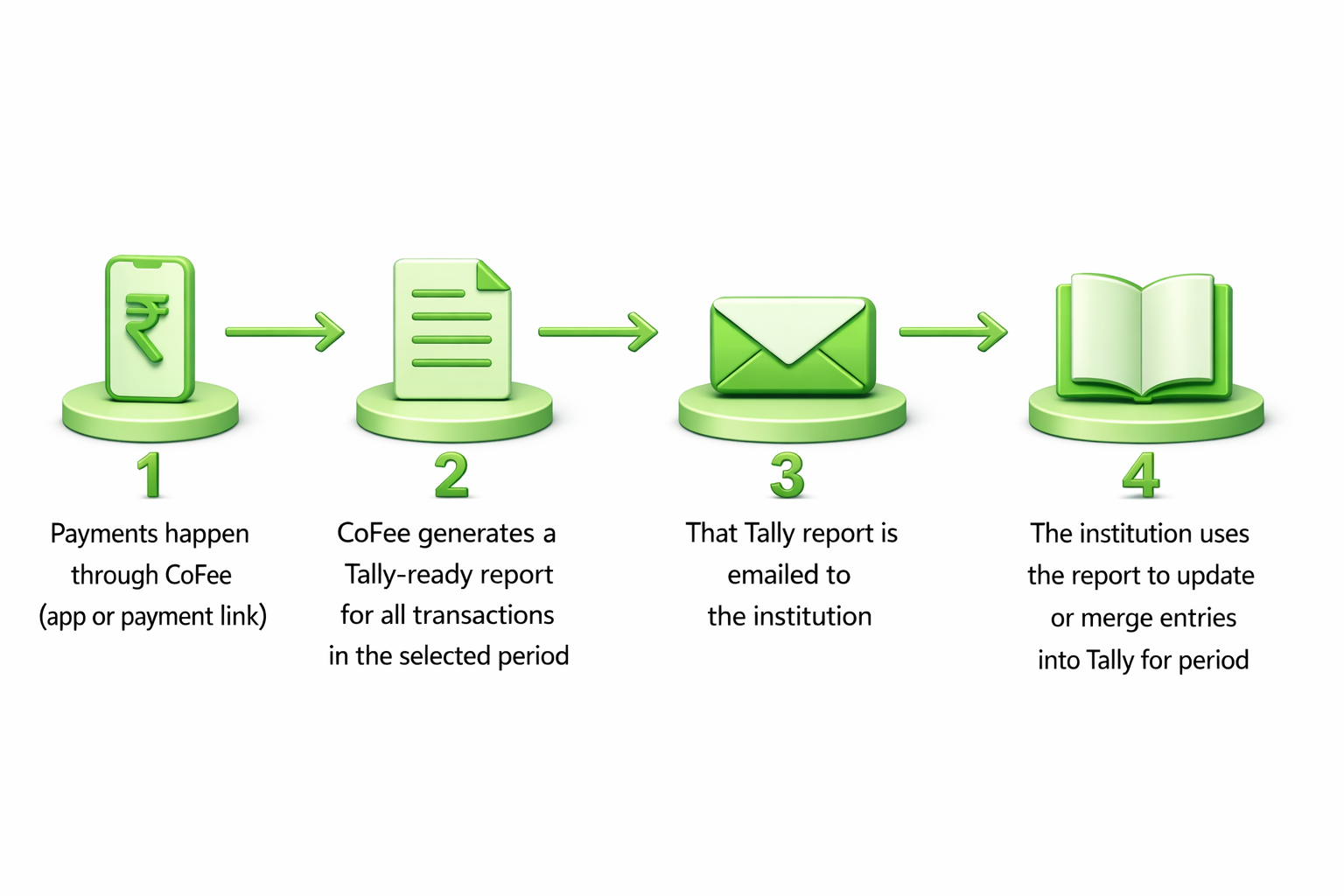
That’s the flow: CoFee collects fees, converts them into a Tally-compatible report, sends it to you, and your team updates Tally using that report.
Benefits of using CoFee x Tally integration
- One ready report, not raw data
Your accounts team gets a Tally-ready Excel/CSV file they can post from directly. - Fits your update routine
Choose daily, weekly, or monthly reports based on how you close your books. - Matches how you already use Tally
Use your preferred student identifier and fee heads, so ledgers stay familiar. - Covers both online and offline payments
Include cash and bank transfers recorded in CoFee in the same report. - Keeps bank wise clarity
Map CoFee bank accounts to Tally bank ledgers so reconciliation stays simple.
All of this means your team spends less time preparing data and more time simply keeping your books clear and up to date.
Get CoFee Now!
Collect—Remind—Track.
Simplify fee collection with a single platform.


How different institutions benefit from CoFee x Tally integration
Colleges, universities, and coaching centres
Most colleges and coaching centres use Tally to keep course wise and department wise income clear, and to stay compliant on fees, GST, and payouts.
They can use CoFee x Tally to:
- Get course wise or batch wise fee data from CoFee into Tally, so accounts can see how each program is performing.
- Post instalment based collections correctly in Tally for the current period, while CoFee continues to track what is still due.
- Keep student and bank entries consistent in Tally, so posting stays clean and predictable.
Schools and preschools
Schools and preschools usually treat Tally as their main book of record for everything related to fee income, transport, and sometimes branch-level reporting.
They can use CoFee x Tally to:
- Move daily or monthly CoFee collections into Tally so the accounts always match what is shown to management.
- Record each type of fee separately in Tally, like tuition, transport, hostel, lab, and activity fees, instead of mixing everything together.
- Maintain branch wise or campus wise accounting by using the Tally report as the input for how each branch is recorded.
Art, music, sports, and other academies
These academies often use Tally as a simple way to track income per program and basic business health, without a big finance team.
They can use CoFee x Tally to:
- Record income per class, course, or batch in Tally based on how they name each program in CoFee.
- Combine recurring subscriptions and one-time workshop payments into a single Tally report for that period.
- Keep a clean view of overall earnings versus expenses in Tally, while CoFee focuses only on collecting the fees smoothly.
Ready to bring CoFee and Tally together?
CoFee already handles the hard part of fee collection. Parents pay through CoFee Pay or payment links, and institutions get clear visibility into dues and receipts.
With Tally integration, those same collections can now appear in your accounts in an organised, Tally ready format. Your finance team gets structured reports. Your admins get better control. Your leadership sees numbers that match across CoFee and Tally.
If you already use CoFee, talk to our team and get Tally reports switched on for your institution.
If you are still collecting fees through WhatsApp messages, spreadsheets, and manual calls, this is a good time to move. CoFee gives you smoother collections, a better payment experience for parents through the CoFee Pay app, and cleaner accounting for your team.
Switch to CoFee and let your collections and books work together.
Automate your
fee collection today.
FAQs
1. What is CoFee x Tally integration?
It is a way to take all the fee collections happening on CoFee and get them in a Tally ready report. Your accounts team can use this report directly while updating Tally.
2. What exactly does the Tally report contain?
The report includes the main details your accountant needs, like student reference, chosen identifier (admission number, name, or mobile), amount paid, type of fees, payment method, and basic transaction notes.
3. How often will we get this report?
You can choose the schedule inside CoFee. Institutions usually pick daily, weekly, or monthly, depending on how often they update Tally.
4. Is this an automatic sync into Tally?
No. CoFee prepares and emails a Tally compatible Excel/CSV file. Your accounts team then uses this file as a guide while posting entries in Tally. This keeps full control with your finance team.
5. Do we need to change how we use Tally today?
No. Your Tally process stays the same. CoFee simply gives you a cleaner, ready format so your team does not have to build or clean reports by hand.
6. How can our institution start using CoFee x Tally?
If you already use CoFee, just reach out to our team and we will switch on Tally reports for your institution. If you are new to CoFee, you can get started with fee collection and Tally friendly reports in one place.